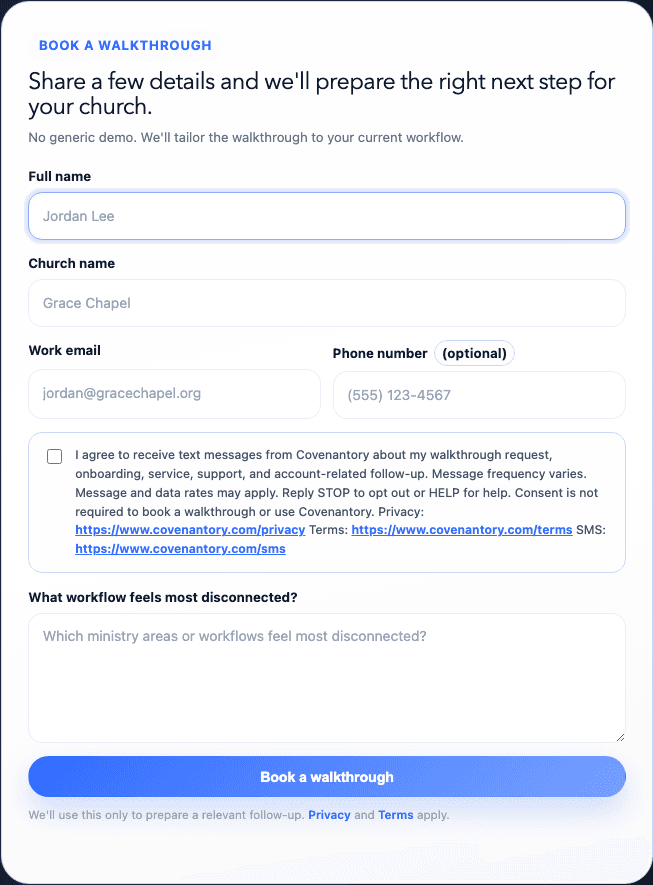
These are screenshots of the actual consent surfaces used for the narrow Covenantory Platform SMS campaign. The campaign covers opted-in prospective customers, tenant administrators, staff users, and authorized business contacts. It excludes church-to-member messaging, donor communications, giving or event reminders, pastoral care messages, ministry announcements, and Text-to-Give.
Public walkthrough disclosure version 2026-08. Signed-in user disclosure version 2026-08.
Consent is optional, unchecked by default, and never inferred from a phone number, invitation, activation agreement, or tenant Person record. The onboarding wizard asks for a church organization/billing phone, not the authenticated user’s mobile number, so it does not offer or record Platform SMS consent. Invited users opt in only for themselves through Notification preferences.
Prospective customer — public walkthrough requestThe prospective customer may enter a mobile number and opt in directly below it. Checking the initially unchecked box and submitting the form confirms consent. Phone and SMS consent are optional, and the walkthrough request can be submitted without either. When checked, Covenantory stores the phone, opted-in status, public_walkthrough_request source, disclosure version and text, timestamp, IP address, and user agent with the request.
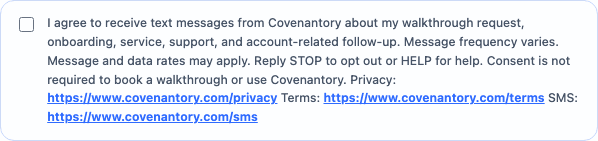
Walkthrough phone and consent detailThis close view shows the affirmative control and full disclosure at the point of collection. The checkbox is unchecked by default and is separate from Privacy and Terms. Leaving it unchecked does not block submission or any Covenantory service.
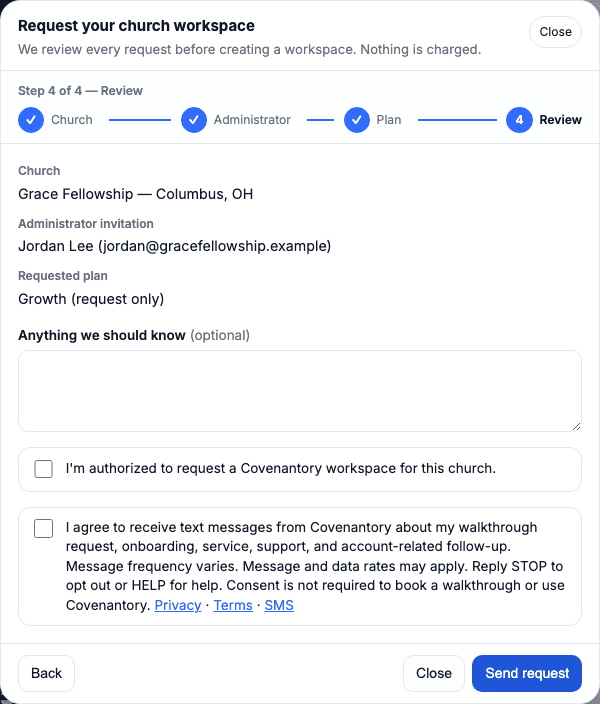
Prospective customer — church workspace requestA church can also request its Covenantory workspace in a short guided form. On the final review step, the requester confirms they may request the workspace (required) and, separately, may check the initially unchecked SMS box shown here. It appears only when the requester is the named administrator and has entered their own US mobile number; it is never offered for someone they nominate. The wording, version, and stored evidence are the same as the walkthrough form above. Leaving it unchecked does not block the request, and the activation invitation is always sent by email. A text with the same invitation is sent only to the number that agreed, from Covenantory, after a team member reviews the request.
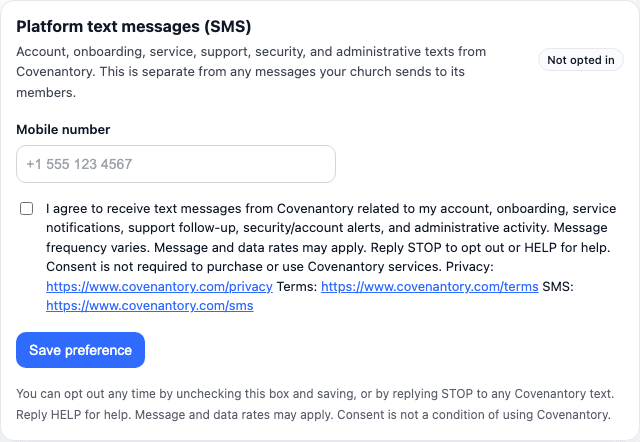
Invited administrator or staff user — Notification preferencesAfter accepting an invitation and signing in, each administrator or staff user enters their own mobile number here. Checking the initially unchecked box and selecting Save preference records self-consent; leaving it unchecked does not block account use. Covenantory stores the user and tenant IDs, normalized phone, opted-in or opted-out status, admin_notification_preferences source, disclosure version and text, timestamp, IP address, and user agent. Tenant Person communication preferences are not used for this campaign.